Spring Boot × Concourse CI/CD 実装 — PR テスト + Docker Push パイプライン
Spring Boot アプリを Concourse でビルドする最小実装。Pull Request トリガーの Unit テストと、master へのマージで Docker Registry Push を行う YAML を丸ごと解説。
本稿で作るもの
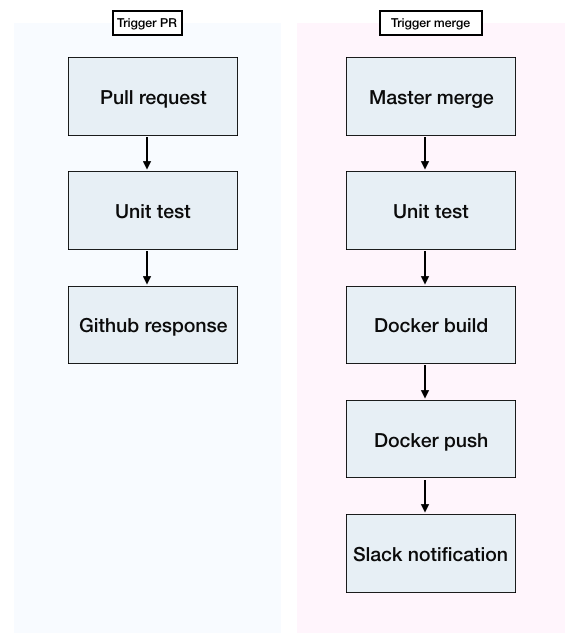
Spring Boot アプリ 1 本に対して、Concourse で以下 2 ジョブを組む最小パイプラインを作ります。
- Pull Request トリガーの Unit テスト (Continuous Integration)
- master マージで Docker Image を Build → Push (Continuous Delivery)
Concourse アーキテクチャ の基本知識があると読みやすい内容です。
Concourse の構成要素おさらい
| 要素 | 役割 |
|---|---|
| Resource | 外部システム (Git / Docker Registry / Slack) との連携定義 |
| Resource Type | 標準にない Resource 実装 (コミュニティ Docker Image で拡張) |
| Job | 複数ステップから成るパイプライン単位 |
| Task | Job 内の 1 ステップ (Docker コンテナ 1 回分の実行) |
fly set-pipeline で YAML を反映すれば動きます。
pipeline.yml 全体
resources:
  - name: repository
    type: git
    source:
      branch: main
      uri: git@github.com:example/spring-boot-app.git
      private_key: ((github-deploy-key))

  - name: pull-request
    type: pull-request
    source:
      uri: git@github.com:example/spring-boot-app.git
      repo: example/spring-boot-app
      access_token: ((github-access-token))
      private_key: ((github-deploy-key))
      base: main

  - name: app-image
    type: docker-image
    source:
      repository: ((docker-hub-account))/spring-boot-app
      username: ((docker-hub-user))
      password: ((docker-hub-pass))

resource_types:
  - name: pull-request
    type: docker-image
    source:
      repository: teliaoss/github-pr-resource

  - name: slack-notification
    type: docker-image
    source:
      repository: cfcommunity/slack-notification-resource
      tag: latest

jobs:
  # 1) Pull Request が来たら Unit テスト
  - name: unit-test
    serial: true
    public: true
    plan:
      - get: pull-request
        trigger: true
        version: every
      - put: pull-request
        params: { path: pull-request, status: pending }
      - task: unit-test
        file: pull-request/concourse/tasks/unit-test.yml
        input_mapping: { repository: pull-request }
        on_success:
          put: pull-request
          params: { path: pull-request, status: success }
        on_failure:
          put: pull-request
          params: { path: pull-request, status: failure }

  # 2) main にマージされたら Docker Image を Push
  - name: deploy-image
    serial: true
    public: true
    plan:
      - get: repository
        trigger: true
      - task: unit-test
        file: repository/concourse/tasks/unit-test.yml
      - task: build-image
        file: repository/concourse/tasks/build-image.yml
      - put: app-image
        params:
          build: out
          tag_file: out/tag.txt
パラメータの (( )) について
(( )) は Concourse の Credential Manager プレースホルダ 。
fly set-pipeline 実行時に -l credentials.yml で値を注入するか、
Vault / AWS Secrets Manager 等の外部 Credential Manager から自動解決させます。
credentials.yml (ローカルの秘匿ファイル):
github-access-token: ghp_xxxxxxxxxxxx
github-deploy-key: |
  -----BEGIN OPENSSH PRIVATE KEY-----
  ...
  -----END OPENSSH PRIVATE KEY-----
docker-hub-account: glossvation
docker-hub-user: ci-robot
docker-hub-pass: ********
絶対に Git にコミットしない (.gitignore に入れておく)。本番は Vault 等を使うべき。
Task 定義ファイル
concourse/tasks/unit-test.yml
platform: linux
image_resource:
  type: docker-image
  source: { repository: eclipse-temurin, tag: 17-jdk }
inputs:
  - name: repository
run:
  path: /bin/bash
  args:
    - -lc
    - |
      cd repository
      ./gradlew --no-daemon clean test
concourse/tasks/build-image.yml
platform: linux
image_resource:
  type: docker-image
  source: { repository: eclipse-temurin, tag: 17-jdk }
inputs:
  - name: repository
outputs:
  - name: out
run:
  path: /bin/bash
  args:
    - -lc
    - |
      cd repository
      ./gradlew --no-daemon bootJar
      cp build/libs/*.jar ../out/app.jar
      cp Dockerfile ../out/
      echo "$(git rev-parse --short HEAD)" > ../out/tag.txt
Docker Image のビルド自体は put: app-image の時に docker-image resource が担当します (DinD 不要)。
リソースの中身
| name | 役割 |
|---|---|
repository | main ブランチの Git リポジトリ |
pull-request | GitHub の Pull Request (teliaoss/github-pr-resource で管理) |
app-image | ビルド成果物を Push する Docker Registry パス |
teliaoss/github-pr-resource は Concourse コミュニティ製の Resource Type。
2018 年当時の jtarchie/pr は現在非推奨で、teliaoss 版がメンテ継続中。
パイプラインの反映
fly -t my-ci set-pipeline \
  -p spring-boot-app \
  -c pipeline.yml \
  -l credentials.yml

fly -t my-ci unpause-pipeline -p spring-boot-app
-t my-ci は fly login -t my-ci -c https://ci.example.com で事前に設定したターゲット。
2024 時点の現実解
本稿は Concourse を対象にしていますが、同じ要件 (PR テスト + Docker Push) を GitHub Actions で書いた場合は以下の 1 ファイルで済みます:
name: CI
on:
  pull_request:
  push:
    branches: [main]

jobs:
  test:
    runs-on: ubuntu-latest
    steps:
      - uses: actions/checkout@v4
      - uses: actions/setup-java@v4
        with: { java-version: '17', distribution: 'temurin' }
      - run: ./gradlew clean test

  build-and-push:
    if: github.ref == 'refs/heads/main'
    needs: test
    runs-on: ubuntu-latest
    steps:
      - uses: actions/checkout@v4
      - uses: docker/login-action@v3
        with:
          username: ${{ secrets.DOCKER_USER }}
          password: ${{ secrets.DOCKER_PASS }}
      - uses: docker/build-push-action@v5
        with:
          push: true
tags: glossvation/spring-boot-app:${{ github.sha }}- Credential Manager 不要 (GitHub Secrets で済む)
- Resource Type の管理不要
- Pull Request との統合も Actions ネイティブ
既存の Concourse 資産を活かす必要がない新規プロジェクトなら GitHub Actions が圧倒的に軽量 です。
落とし穴
1. serial: true を付けないと並行実行で壊れる
同じジョブが複数並行で動くと、Docker Push のタグ衝突や DB マイグレーションの競合が起きます。 テストジョブはシリアル実行で守る。
2. Private Key の改行がうまく渡らない
private_key 等のマルチライン値は YAML の | 記法でちゃんと渡す。
fly set-pipeline に渡すときの -l credentials.yml 側で正しく書く。
3. PR Resource の認証スコープ
teliaoss/github-pr-resource は GitHub の PR / Status API を叩くので、
repo スコープ付きの Personal Access Token が必要。期限切れ時のアラートを運用に組み込む。
4. ビルドキャッシュが効かない
毎回ゼロから Gradle 依存をダウンロードすると遅い。
.gradle を Baggageclaim Volume として共有、またはキャッシュ付き Docker Image で改善を。
まとめ: Concourse の Spring Boot パイプラインは、 Pull Request Resource + Docker Image Resource + 標準 Task で素直に書けます。 2024 時点は GitHub Actions の方がカロリー少なく同じことができるので、 既存の Concourse ユーザー向けの保守・移行検討資料 として参照するのが現実的です。
関連記事
 クラウド·
Concourse CI アーキテクチャ解剖 — ATC / TSA / Worker はどう連携するか
Concourse の内部コンポーネント (ATC / TSA / Worker / Garden / Baggageclaim / PostgreSQL) の役割と通信フロー。YAML 駆動 + Docker Job の設計思想、2024 時点の立ち位置も含めて整理。
 クラウド·
Concourse on Kubernetes 検証メモ — Helm 導入と本番運用で考えること
Concourse を Kubernetes 上にデプロイする構成メモ。Helm チャートでの立ち上げ手順、Worker ノードを DaemonSet で配置する設計、本番運用での留意点と 2024 年の現実解。
 クラウド·
Cassandra データモデル入門 — AP 選択の帰結としてのマスターレス分散 DB
CAP 定理で AP を選んだ結果としての Cassandra アーキテクチャ。マスターレスのゴシップ通信、パーティション分散、レプリケーション戦略、ACID ではなく AID という表現までを RDBMS 比較で整理。